Pipeline Stage 5: Production
Explore how the Production stage plans shots, generates each one, and renders your final video automatically.
Planning the Shots
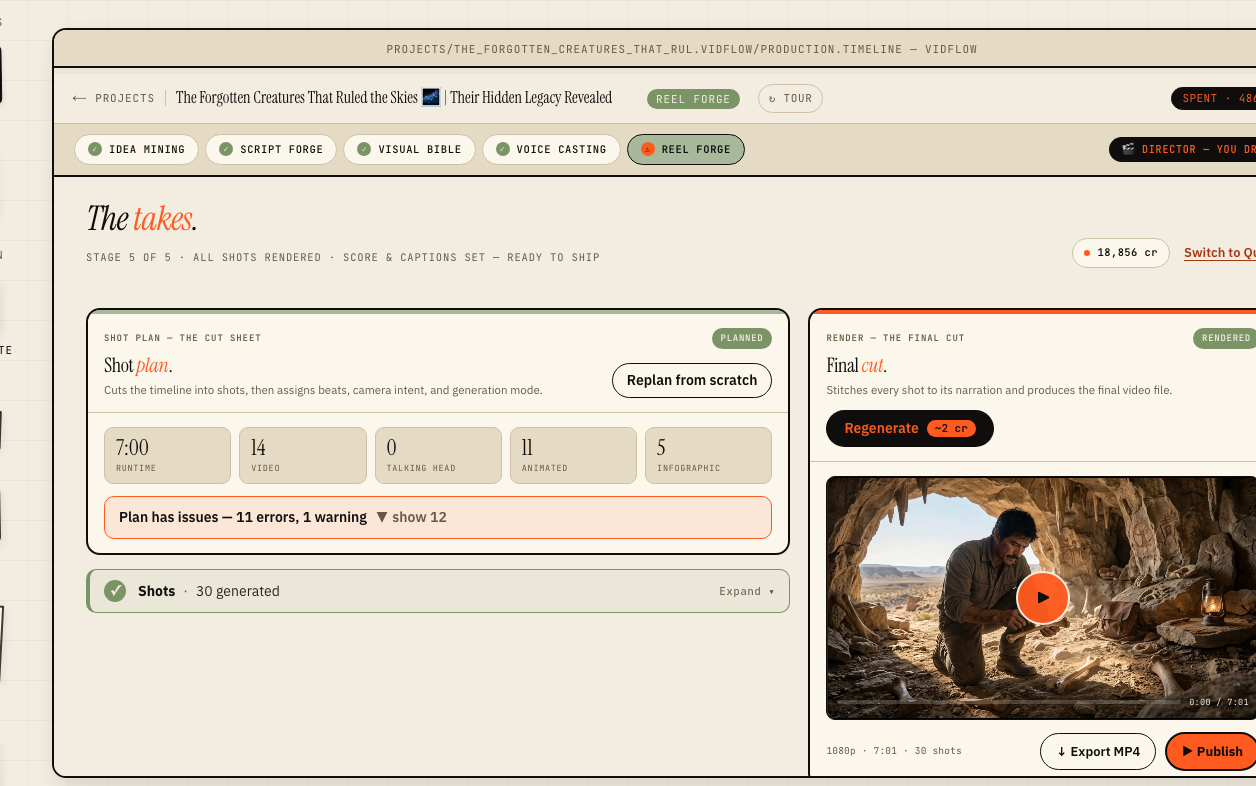
Production starts by planning the shots for your video from the approved script and voiceover. Each shot gets a generation mode that decides how much work — and how many credits — it takes: a still image is the cheapest at about 2 credits, an animated still adds Ken Burns motion at render time for the same image cost, and a full video shot generates a clip on top of the image for roughly 16 credits. A talking-head shot is the most expensive at about 18 credits.
Generating Each Shot
Shots generate image-first: VidFlow renders the shot image, then — for shots that need motion — generates a video clip from that image. You can kick off the whole batch at once or generate shots individually, and any shot that fails or that you are not happy with can be regenerated on its own without touching the rest. Because the per-shot mix drives most of a project's cost, the production view sums the real credit total before you confirm a batch.
The Automatic Render
Once the shots are ready, VidFlow renders the final video server-side — there is no manual timeline to assemble. The renderer stitches your clips to the voiceover and applies transitions, Ken Burns motion, and captions automatically, deriving them from the script and Visual Bible rather than asking you to choose each one by hand. Output is a 1080p HD MP4, and most renders finish in a few minutes.
Downloading and Publishing
When the render is done you can download the MP4 or publish straight to a connected YouTube channel. The final video carries your Visual Bible style, the captions synced to your voiceover, and the audio mix — all produced automatically from the work you approved in the earlier stages.